Hello again!
Is there a way to get a headline option inside the page overlay settings?
Ideally, it would offer the same positioning options as the Close Icon tab, with a text field instead of the close icon.
Hello again!
Is there a way to get a headline option inside the page overlay settings?
Ideally, it would offer the same positioning options as the Close Icon tab, with a text field instead of the close icon.
Hi Guys,
working on a new website and i am wondering how to achieve the ghost mousetrail effect?
Ideally i can place images on my page with auto movement inside my viewport with a subtle ghost/bur trail like in the attached example from laythemes IG.
i assume float physics per image are better than the new scroll slider?
Thanks a bunch!
clearing the cache and disabling all unneccessary plugins unfortunately did not help. you've got mail with the info. Thanks!
hey @arminunruh i guess the update is still in the works?
Hey armin, appreciate it! thanks!
Hello,
since the last wordpress updates the project thumbnail mouseover images do not scale properly anymore.
previously the mouseover images filled the thumbnail regardless of aspect ratio, now it seems, that they are scaled down to contain aspect ratio, which leads in some cases to smaller mouseover images than the actual thumbnail.
i tried deacticating my caching plugin and custom css but the issue seems to lie somewhere else.
any idea how to achieve the previous behavior?
thanks!
Hey armin,
thanks this works well!
weird i used the search for this and had no luck finding it..
Hello there,
i have a one pager with main menu items linking to specific anchors on the webpage.
the navigation between the anchors work just fine, but somehow it is not possible to use the sitetitle / logo to jump back to top.
is there a way to do this?
thanks and br
martin
Hello,
I have a similar question, although it's not related to the loading speed of my site.
It would be fantastic if there could be a "load more" button similar to the news feature. Is there a possibility to integrate an option that determines the number of thumbnails loaded initially, along with the ability to display more if desired (via a load more button)?
is it possible to integrate somehow?
@arminunruh hey thanks for the reply. for the time being i created a html element as you suggested.
Hey there,
is there any way to do a list with icons?
Something like the Social Media Icon Element with "Captions" and the ability to left align on top of each other would be super great!
Hi there,
is it possible to disable the on scroll element transitions for mobile/tablet only?
Or anyway to improve the performance?
Somehow the animations are really really chopped up on mobile devices 🤔
www.max-office.gmbh is the domain
i tried it again with another thumbnail grid and now its working 🤔
can't recreate this issue either hmm.
dont know what happened there
EDIT:
seems to happen when returning into edit mode. Will send you my login data now!
Sorry this post should go here, not in general discussion...
Hi Guys,
first of all big big thank you for releasing the filter option for the thumbnail grid, just in time for a project of mine and such a great addition to laytheme!
I know it is merely released and i just tried it out. Unfortunately when i try to configure my thumbnail grid not all of my project categories are listet in the draggable order list. Oddly it even doubles some categories in this list:
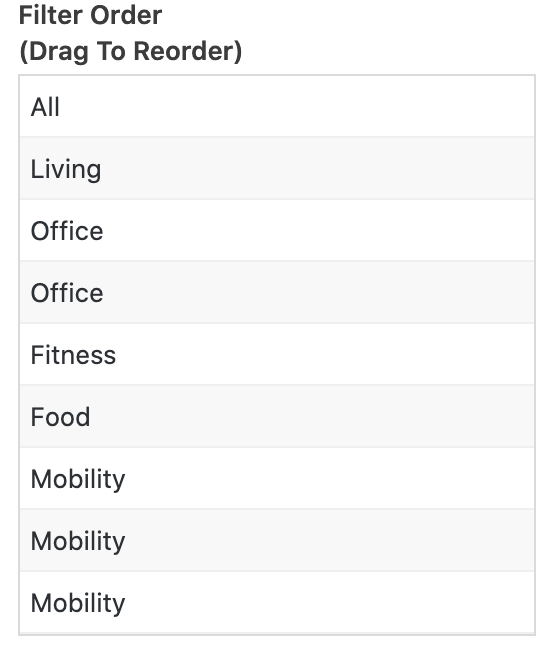
those are my categories btw:
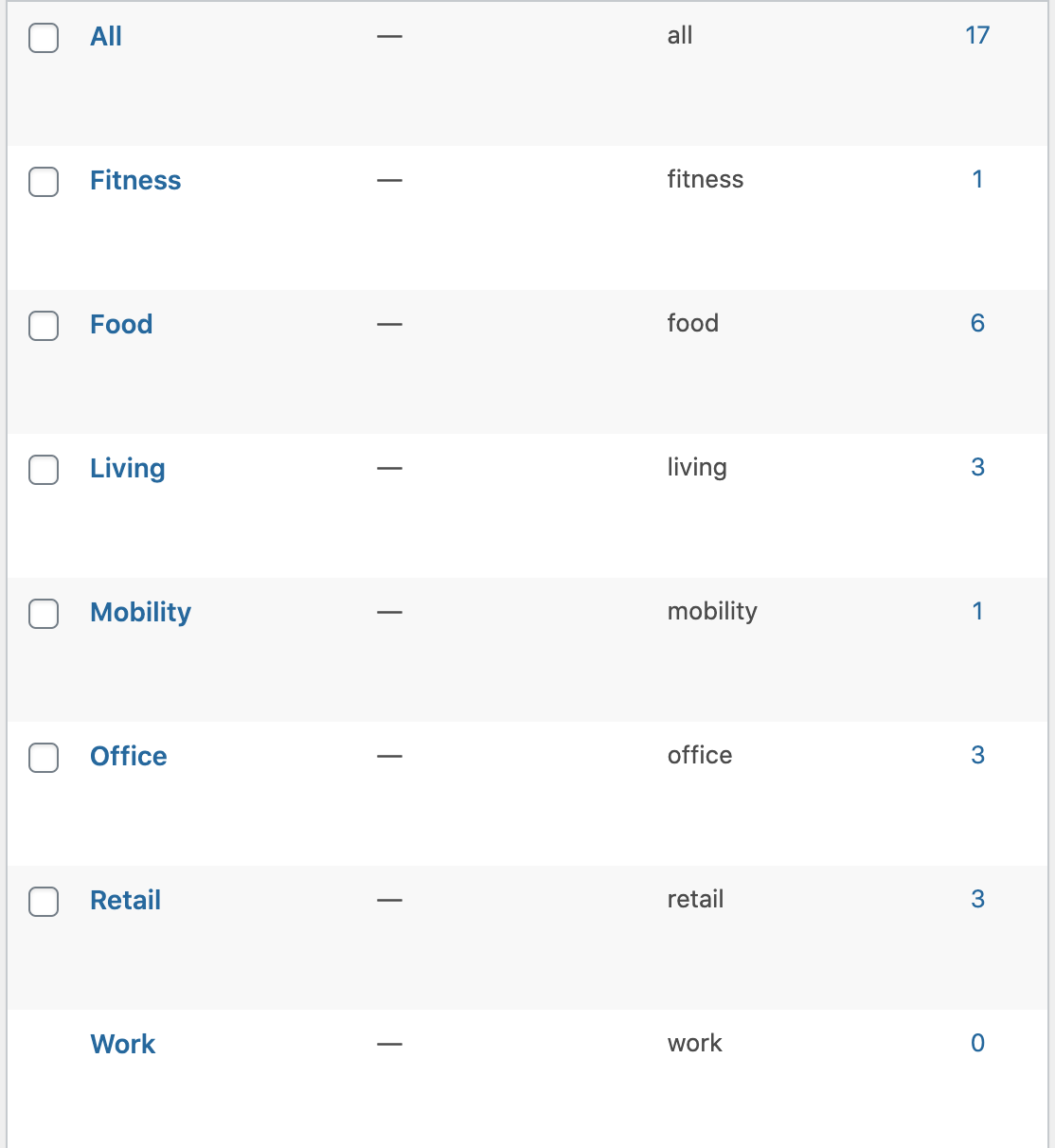
would be great if you guys could help me to sort this out!
Thanks!!