Hi,
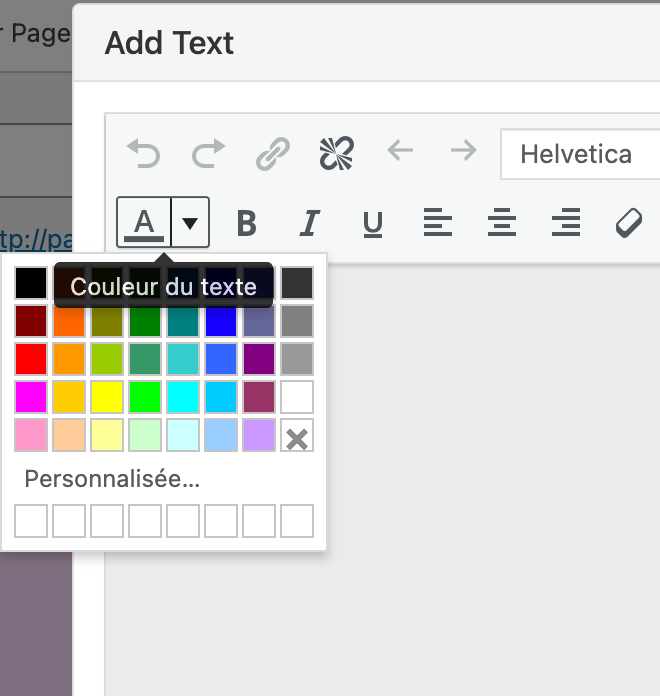
I would like to know how to add a custom color in the text color editor? not just in the custom part, but that the color is always displayed and available.
Thanks!
 N
N
Hi,
I would like to know how to add a custom color in the text color editor? not just in the custom part, but that the color is always displayed and available.
Thanks!
Thanks @edgrbnz and @mariusjopen :)
Thank you @mariusjopen !
I have a bit of a strange problem, when I make changes on my site they are not visible on Chrome. The site is not refreshed. I have to force it by going to the Chrome Inspector. On Firefox it works very well. I don't know how to "force" Chrome to refresh my site.
The details:
Wordpress version 5.4.1
Lay Theme: 3.2.9
Thanks for your help !
Hi @mariusjopen
It's works! :D Thank you very much.
Here's how I did it with the help of your links:
window.laytheme.on("newpageshown", function(layoutObj, type, obj){
    jQuery("#button").click(function() {
    jQuery('html, body').animate({
        scrollTop: jQuery("#myid").offset().top
    }, 2000);
});
});
for now this code works on a single id and link. I will try to adapt it to do this on several different links and ids.
Hi @mariusjopen
I think it's the idea, but i want to do that in the same page :
1- i put an image and i make an id (like hello)
2-i have a text link in this page (at the top for exemple) and in the link url i write this : http://mysite/#hello
3-when i click on this text link i want to go to the image with smooth scroll effet :)
It is possible? Here is my website with the menu with links which refers to the images (but not with smooth effect): http://druidhigh-visuals.com
Thanks!
Hi, is it possible to make a link to a section with an id and the effect like the "scroll to top" button?
Thanks!
Nicolas
@mariusjopen Hi Marius, thank you for your anwser. Do you have a link or an exemple to use JQuery to slide when open a page? It would help me a lot.
Thanks,
Nicolas
Ok.
I fixed it with this:
.thumb .below-image .descr {
    white-space: pre-line;
}
Nobody can help me?
If anyone has a solution to this problem, thanks!
Hi! I don't understand why i can do a line break in a project description for thumbnail. I try to add <br> in code source but it doesn't works.
How can i make a line break?
Here is my website: http://lab.ifm-paris.com/participants
ok thanks, i just want to make an anchor link between pages.
I'll try to do that with your link.
Here is my website : http://nicolastilly.fr/
Hi! I want to make a link on an image (simple :) ) that points to a page that has an element with that id. For exemple when i clic on the image on home page it's go to a title with the id "mytitle" on the good page (for exemple the url is: http://www.mysite.com/#mytitle).
But when i clic on my image it's doesn't go to the id but only to the page (and not the title in this page).
Is it possible? And is it possible to do that like the "scroll to top" button effect?
Thanks!
it works !
I had just forgotten to add a "}" in my code :)
Hi @mariusjopen
I don't understand which username and password do you want in the email?
Hi @Marius
Or course here is my website: [http://s480000440.onlinehome.fr/wp-test](link url)