So I know about secondary menu's but this vertical menu needs to appear at page Menu item 1. I'm sure its possible to use css and hide this menu on other pages. But I want the "articles" to be projects which get added automatically to this vertical menu. Under different authors names.
Is there a way to automatically add these through tags or categories? Like with a project index?
R
Remco van Dun
@Remco van Dun
Posts
-
Fixed Article menu -
Event plugin: show lay header and footer on event pageThanks both for replying, I also got this to work yesterday but now looking at ways to change the styling to my liking. Im sorry I'm not sure how to help you with the footer page
-
Fixed Article menuHi!
Been breaking my head over how to execute this idea in the backend. It comes down to a vertical fixed 'secondary menu' on a specific menu page that contains articles from different authors.
Selecting an article should change the middle column content, and keep the article column fixed on the left. But it should also be easy to add another author and articles...
Example:
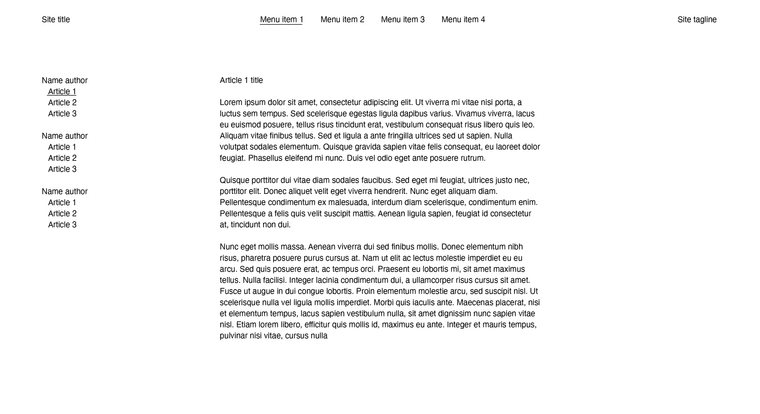
I've tried a news item and project index as a workaround but this didn't seem practical unless I'm missing something.
Adding a secondary menu sounds too complex to add new articles to and manage the content?
If any body has an idea or can send me the right direction would be appreciated. -
Event plugin: show lay header and footer on event pageBut, what you achieved at https://tonhalle.at/events/ is exactly what I'm trying.
Would love to hear about this and might be able to compensate you for your time. -
Event plugin: show lay header and footer on event page@dabu do you mind sharing how you got a calendar to work? Would love to know.
You can reach me at info@remcovandun.nl -
Major Issue with theme update from v9.5.5 to v9.5.6: missing files in packageDoes this update automatically? I'm not able to update the theme anymore

-
subpages do not load since last updateSame for me
-
slow navigation WP admin control panelI seem to be experiencing something similar with rest api error in the site health status? The notification has since been removed over there but still experiencing slow loading times or freezes. I will email you my information.
-
Text marquee space in between not workingI've tried without custom css but that doesnt fix it for me. Also checked to make sure all devices have a set distance.
At the bottom of the page I've added a marquee composed of different text entries for each city.
https://motusmori.remcovandun.nl/about/
It looks ok now but would be nice to use the space in between feature the way it's intended of course :)
-
Text marquee space in between not workingHi Layteam!
I've noticed the space in between feature does not change anything in the text marquee? Is this something you would have a look at?
For now I'll just add whitespace behind the texts because a whitespace as separator is also not an option?
Thanks!
-
Create 'inactive' menu for submenu on hover@arminunruh
Thanks for the quick replyForgot to mention, I know about click but was wondering if this could be possible with on hover feature?
So hover, yes
Click, nopointer-events: none; unfortunately takes out the entire submenu.
-
Create 'inactive' menu for submenu on hoverHi,
was wondering if there is an easy way to make a menu parent 'inactive'?
I'd like to have all the menu items as a submenu under INFO. Yet if you click info it will lead you to this page, so I'd like it to be inactive. Any options to do this? -
Row image background wrong side -
Row image background wrong sideHi!
A while ago I made this website
https://www.ns16.nl/And I've set the background image to the right side but somehow it moved it to the wrong side?
If I add a left background image it does show both next to each other the way they are set.
I've also checked without custom css and it remains on the wrong side.
Hope to hear if this is a fixable bug?
best,
Remco -
Collapse row when opening otherI've updated my Info page with the collapsed subcategories for each service. Thanks, I didn't even notice the top margin jump yet. I was looking at the way the content seem to move up from the bottom if you toggle between the services was odd.
Actually... this would be solved if there was a checkbox 'close other row before opening new row'?
And to make them appear from the same top margin I had to set all the gutters for the rows after the first to 0%. Maybe not how you intended but works for me :)
-
Collapse row when opening otherI've seen your new update 'collapse other rows'. This kind of fixes it, thanks!
content moves a little weird from the bottom once you click through the options... Should it close first and open a new row another? Not sure if thats better. -
Collapse row when opening otherGreat addition with the collapsible rows! Used custom code before but this is way more practical and doest restrict to the one row under the button.
That being said, is it possible to have a opened row collapse when a new one opens?
I've set up an example where I'd be able to use a summary of services with a collapsible row underneath.
https://remcovandun.nl/info-2/
When you click on Graphic Design the matched design services show.
Clicking on a different service should close the previous while opening the new row? Maybe a 'only 1 open row at a time' checkbox in the lay options somewhere?
best,
Remco -
Set HTML class and ID message window stuckHi,
Just checking if this is something you want to fix?
Was trying something by adding a class to a background, but the message window doesn't close when confirming it by clicking the save button. It does save the set class if you close the window manually.
-
Carousel - Always scrollingMaybe use a marquee element with just images?
-
Choose Background colorHi @anagase
Do you perhaps care to share how you made this work on your website!? Looks great and trying to figure it out myself.
best,
Remco