@chris.vuko Thanks Chris, I will try now
S
spontans
@spontans
Posts
-
Bug in LayTheme 11.5.1 – Right-click in Gridder causes React render error -
Bug in LayTheme 11.5.1 – Right-click in Gridder causes React render errorsame here.
-
searching for costum designhi, if you still need help please feel free to reach out
spantan@gmail.comhere is my portfolio: cleanplatestudios.com
-
CustOM order for project indexHi Armin,
I'm also struggling with ordering the project index module.
Dor order by "Project Overview" relate to the order appears in the draggable project list under the overall Projects tab?Also, the order that appears in the admin doesn't always corralate with what I see on the actual website... attaching some screenshot. Cache is disabled.
The page address:
https://lionsandquilts.com/category/articles/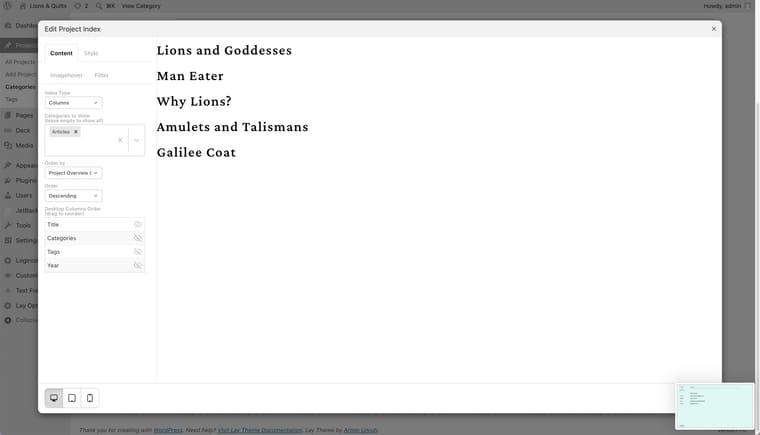
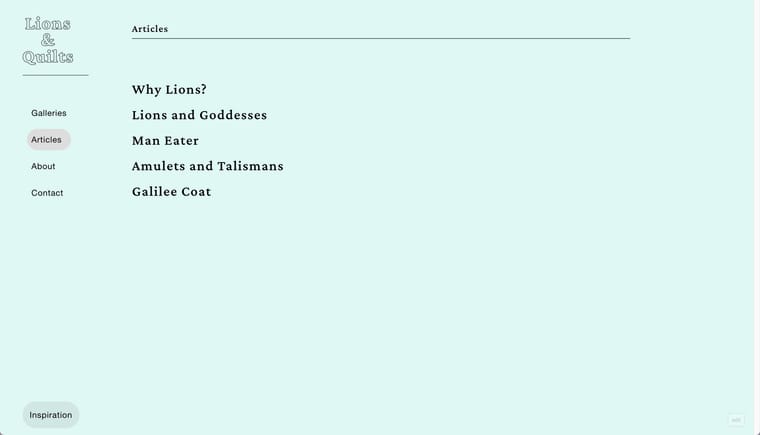
-
would be cool to enable "set hover image or video" in text's links inside inside the element gridYeah 👏! That works now.
And thank you for the inspiring examples with the Project Index tool. -
would be cool to enable "set hover image or video" in text's links inside inside the element gridI have a student who is trying to create a text-first project index,
means that each item of the grid is actually a line\multiple lines of text, and that on hover, she desires an image to appear behind it.I figured out that the easiest way to realize it will be using the Elements Grid, but unfortunately, the text objects there don't allow the image hover function in links!
Maybe it would be nice to consider adding this in the future update.
AND \ OR 🥁🥁🥁
Allowing an option for the thumbnail grid to initially display projects with hidden thumbnails, which will appear only on mouseover.
Sorry if it's not very clear, I'm having a little hangover.
Thanks,
Sasha -
Thumbnail Image aspect RatioThanks Armin,
Worked like a charm, would be very useful if there would a way in the future to control it via the Thumb\Element grid visual interface...I've also implemented it for Element Grid:
.elements-collection-region .ph{
padding-bottom: 100%!important;
}.elements-collection-region .element-wrap img,
.elements-collection-region .element-wrap video{
width: 100% !important;
height: 100% !important;
object-fit: cover !important;
object-position: center !important;
} -
Thumbnail Image aspect Ratiowould be very helpful and freeing of cropping the images manually
-
enable\disable project overlay for certain project categoriesHey Armin,
I love the project overlay feature, but I sometimes want to use it only for a certain category and let the other project behave normally. It could be nice to have control over that.
Another request regarding the overlays is to add an option to hide the menu when the overall opens (The "x"/Close button often overlaps with the menu and actually reduces its need).
Thanks
-
Feature request: place freely but not freely on phoneHi Armin,
I like the "place freely" option for desktop, but I hate creating a mobile layout for mobile if I just want all the elements to be stacked in one row. Maybe it would be nice if there were an option to translate the freely placed layout to mobile or just stack everything.
Thanks
-
fixed footerThank you!
-
active state for index (clarity inside)Thanks Armin,
I never thought of working in that way!
That makes a lot of sense.. merci -
fixed footerHi, It would be nice to have the option to make the footer "fixed".
It might be very useful, especially for those who have a vertical navigation menu on their sites, so the footer can stay fixed at the bottom of the menu side (which is usually a blank space anyways).Cheers
-
active state for index (clarity inside)Hi Armin,
Wanna share with you one thing that my student has pointed out.
Let's say "Works" is my project index page which shows the projects as a thumbnail grid/list or whatever..
When I click on one of the projects, it would be nice if the "Work" menu item's current state would still be active, to give the viewer more orientation.There also can be a tricky situation here...
What if one has several project index pages? 'Works' and 'Exhibition' let's say...
Each index shows only one project category.
I've succeeded in fixing the problem with CSS, but I think that it's quite a basic need, and would be great to see such a feature in upcoming updates!Maybe somehow a page can have an option to be assigned as an 'Index' page for a certain project category...
-
turn off overlay in mobile viewI like your brainstorming monologue in the previous reply (:
Thanks for this solution, it is exactly what I needed!
-
2 questions about vertical menu's submenu systemThanks a lot, Armin.
That works flawlessly!
regarding the empty project pages, re-saving the permalink settings solved the problem. -
2 questions about vertical menu's submenu systemAnd another thing that I've noticed:
When I try to access a project page via a direct link, the page is blank.
(e.g https://cleanplatestudios.com/edr2/dean/an-undertaker-a-hangman-and-a-rabbit-entered-a-hole/) -
2 questions about vertical menu's submenu systemDear Armin,
I appreciate your quick response and update release!
I've checked both options:
"Keep Submenu open until another submenu is opened" and "When clicking on the link that opens a submenu, also show this link's page", but I would like to point out 2 behaviors that I find a bit inconvenient/illogical to me.Instead of writing a long text, I recorded a short video demonstrating what I mean.
I hope it's ok.->
https://share.cleanshot.com/HDK9PG6wMany thanks,
Sasha -
turn off overlay in mobile viewOh, actually I've already disabled the overlay because the user has added more content and it started to overflow... so I will add another question - is it possible to enable vertical scroll of the page on overlays?
Here is the website (I've enabled the overlay again for the Info page):
https://tamirhayun.com/
On mobile, when clicking on the "close" button, it closes the overlay but leaves the menu open. My desired result is that the menu will be closed and the page that lies under the overlay will be shown. -
2 questions about vertical menu's submenu systemhere is an example website
https://cleanplatestudios.com/edr2/dean/