@arminunruh Thanks a lot!
W
wjlz
@wjlz
Posts
-
Image hover not working in rows further on the page -
Image hover not working in rows further on the pageHello,
I have an issue with the image hover not working on rows deeper in the page. The first row works fine as well as on other pages.
I am wondering if this is caused on my end or if it's a bug. It was working fine previously.
I left 'Michael Richards' to be hovered on and as you can see it is not working. When I try it on the first text block on the page there is no problem, and it functions as it otherwise should as you can see on this page.
-
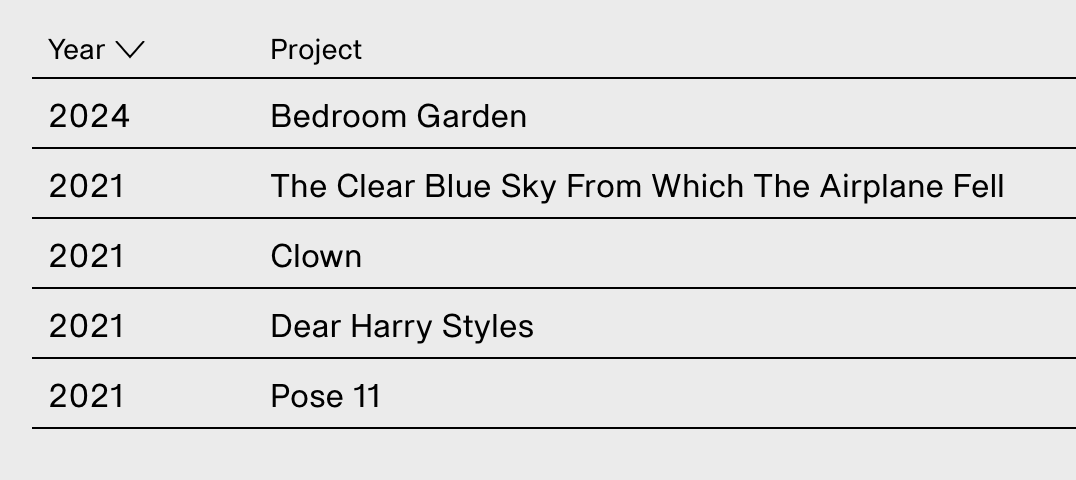
inserting range of years in project indexHello,
I have a question about the project index.
I understand this feature reads the date of publishing from the project page itself, and there is no such function native to Wordpress.
But because this is a project that spanned two years until completion, I was wondering if it is possible to add a custom coded line within this entry.
So "2021" would be "2021 – 22", see images:

-
Carousel captions not working?Hello,
I just activated a new site and wanted to add captions to a carousel. However despite checking the buttons in the plugin settings the captions just don't show up. The numbers show up fine (but I don't need those). Is there a bug within a recent update perhaps?
Thank you!
-
Imagehover covering everythingI had this same problem a while ago, made a topic. It was fixed, now it's back again! Custom CSS wasn't overriding it either.
I'm sorry admins but can this feature be kept consistent? It's really messing with my layouts. 😕
-
Problem with Imagehover – suddenly covering everything?Hello,
It's probably since a recent update(?) because I didn't have this issue when the site was launched.
I have the project index in which previously just the background image would change on hover, leaving everything on top visible.
Now suddenly it's covering everything, so it's impossible to see which project you are hovering on. If I decrease the z-index of the imagehover element, the whole element hides below the main content (and therefore behind the main background).
See: https://nelliserzanowa.com/
I know there is the "fixed and centered" option which leaves the texts visible, but this option leaves empty spaces left and right where I need it to cover the background fully, as it did before.
Is there a workaround here?
Thanks.