Skip to content

Need Custom Coding for Lay Theme? Find 3rd Party Developers here.

Find a developer who can use HTML or JavaScript or CSS to customize your Website. This is just a place to connect people and we do not take responsibility and I do not offer support for any custom coding done for you. The developers here are not part of the team working on Lay Theme.

111 Topics 369 Posts
  • child theme

    2
    0 Votes
    2 Posts
    275 Views
    arminunruhA
    wordpress saves the customizer settings separately for each theme!
  • This topic is deleted!

    1
    0 Votes
    1 Posts
    7 Views
    No one has replied
  • help needed with cleaning up and optimising lay theme portfolio website

    1
    1 Votes
    1 Posts
    131 Views
    No one has replied
  • Quick Paid Gig - Custom BG Animation

    1
    0 Votes
    1 Posts
    116 Views
    No one has replied
  • Rotation + ImageHover Addon (I need help on cool javascript effect :)

    4
    0 Votes
    4 Posts
    312 Views
    arminunruhA
    do u have an example website where the effect is shown
  • 0 Votes
    4 Posts
    280 Views
    arminunruhA
    the scrolling and fixed thing is included in the new sticky feature: https://www.instagram.com/reel/CmG-curDQ_9/?igshid=YmMyMTA2M2Y=
  • Change appearance of categories in URL

    2
    0 Votes
    2 Posts
    177 Views
    arminunruhA
    @ErEs said in Change appearance of categories in URL: this however prevents doing simple changes to specific category site with just css using .slug . well u will still be on the same page, u're just filtering the thumbnailgrid element, its not a real new category page so the bodys slug doesnt change
  • Custom Arrow Cursors with Mixblend-Mode

    2
    0 Votes
    2 Posts
    237 Views
    arminunruhA
    not sure if that works with cursors i think you'd probably need some javascript and custom html. the html are left and right arrow images. then they need to show/hide based on your mouse position, follow your mouse and use the mix blend mode i dont have time to code this for you as its a bit much but if you want to spend some €€ send me an email to info@laytheme.com
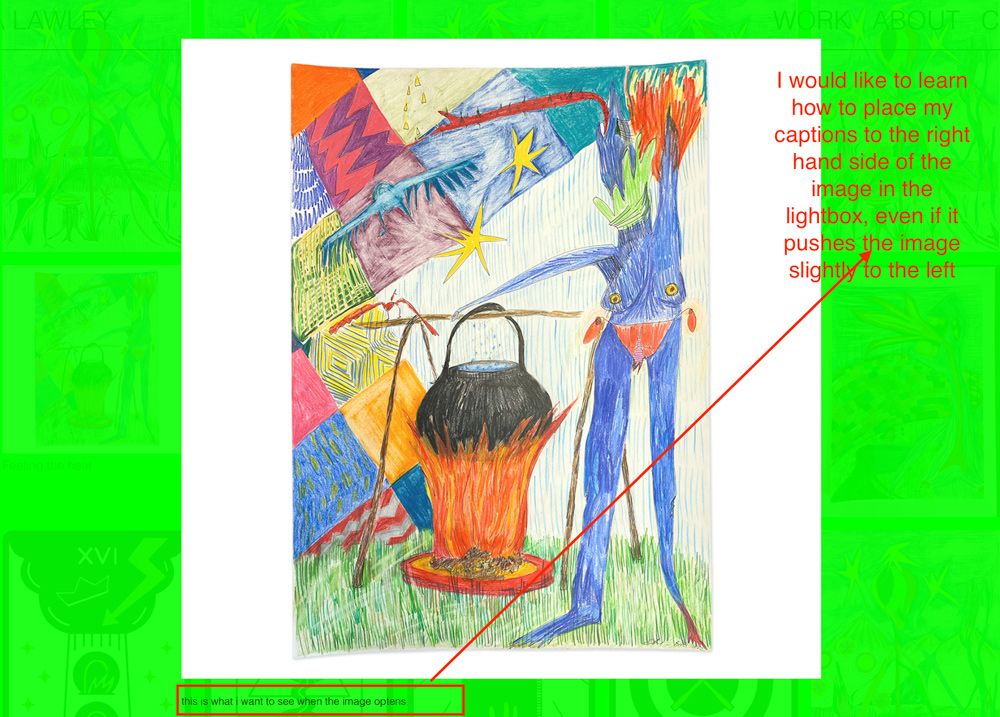
  • change position of caption in lay theme lightbox

    2
    1
    0 Votes
    2 Posts
    199 Views
    F
    @alanna-lawley I could do it in a few steps if you tell me the desired look of the text. compensation would be a tiny painting. mail@felixrabe.de Felix
  • Custom Coding (Paid Job)

    2
    0 Votes
    2 Posts
    146 Views
    CyberSlayersC
    Hi Nicoletta, I Just see your post, I am glad you find me anyway :) Looking forward to our collaboration, Audrey
  • Customizations Fullscree Slider and News Element (Paid)

    2
    0 Votes
    2 Posts
    91 Views
    arminunruhA
    hey please write an email to info@laytheme.com and lmk what it is exactly that you want
  • This topic is deleted!

    1
    0 Votes
    1 Posts
    1 Views
    No one has replied
  • Responsive Image Carousel with fixed height

    3
    0 Votes
    3 Posts
    586 Views
    arminunruhA
    @ErEs said in Responsive Image Carousel with fixed height: for my website i would like to have a responsive carousel with a fixed height (might as well be browser height), which does not change its height even if on smaller screensizes. you can set a fixed pixel height using a custom phone layout u can create another carousel with another fixed pixel height "Give elements a max-width and max-height and center them" effect for single images no :/
  • Job for HTML5 Display Ad

    1
    0 Votes
    1 Posts
    47 Views
    No one has replied
  • Looking for a SEO specialist

    1
    0 Votes
    1 Posts
    101 Views
    No one has replied
  • Character style in a text block

    3
    0 Votes
    3 Posts
    214 Views
    G
    hello! thanks for you answer!, yes, I got there, but in the "text formats" page and while creating a character style I cannot set a shift in the baseline grid (sub/superindex) or a different line height. I did a custom Css that says: .Author{ baseline-shift: 3em !important; } .Title{ baseline-shift: super !important; } (title and author being the character styles that I created in the text formats) nothing changes when I apply these character styles in the text editor any solutions?
  • Toggle Submenu through Site name

    2
    1
    0 Votes
    2 Posts
    120 Views
    arminunruhA
    thanks! just hide the site title in customize -> site title then create a menu with a submenu and put it in the corner of course the first menupoint of that menu should be the same text as your site title's
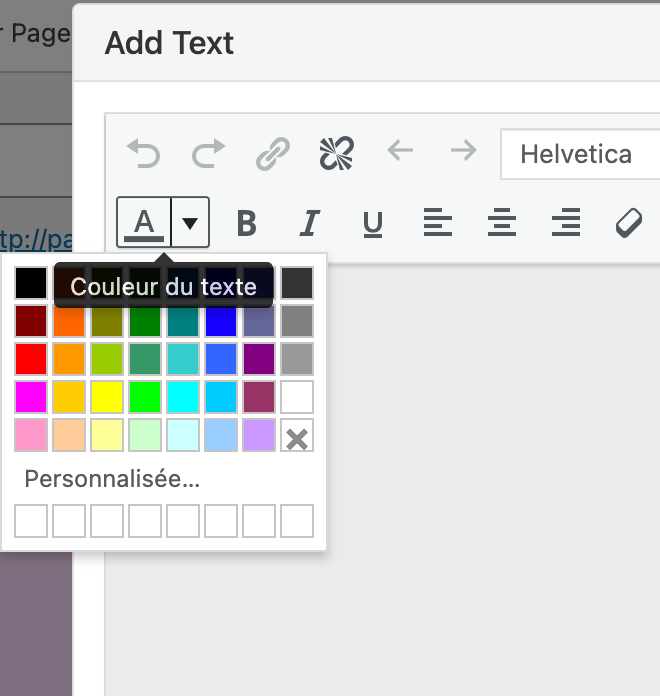
  • Add custom color in the Color Picker text editor

    2
    1
    0 Votes
    2 Posts
    130 Views
    arminunruhA
    hey not possible, maybe create a textformat that uses that certain color and then use that textformat on all of the texts you want to use the color for
  • help

    2
    0 Votes
    2 Posts
    100 Views
    K
    What do u like to do?
  • Submenu: change font

    5
    0 Votes
    5 Posts
    730 Views
    arminunruhA
    maybe try to put !important behind like: font-family: Armag-FuryItalic!important;

I also code custom websites or custom Lay features.
šŸ’æ Email me here: šŸ’æ
info@laytheme.com

Our Web Development company: 100k.studio

Want to tip me? https://www.paypal.com/paypalme/arminunruh

Before you post:
  1. When using a WordPress Cache plugin, disable it or clear your cache.
  2. Update Lay Theme and all Lay Theme Addons
  3. Disable all Plugins
  4. Go to Lay Options → Custom CSS & HTML, click "Turn Off All Custom Code", click "Save Changes"

This often solves issues you might run into

When you post:
  1. Post a link to where the problem is
  2. Does the problem happen on Chrome, Firefox, Safari or iPhone or Android?
  3. If the problem is difficult to explain, post screenshots / link to a video to explain it
Online Users
Forgot your key, lost your files, need a previous Lay Theme or Addon version? Go to www.laykeymanager.com