Skip to content
  • Recent
  • Tags
  • Popular
  • Users
  • Search
Skins
  • Light
  • Brite
  • Cerulean
  • Cosmo
  • Flatly
  • Journal
  • Litera
  • Lumen
  • Lux
  • Materia
  • Minty
  • Morph
  • Pulse
  • Sandstone
  • Simplex
  • Sketchy
  • Spacelab
  • United
  • Yeti
  • Zephyr
  • Dark
  • Cyborg
  • Darkly
  • Quartz
  • Slate
  • Solar
  • Superhero
  • Vapor

  • Default (No Skin)
  • No Skin
Collapse

Lay Theme Forum

arminunruhA

arminunruh

@arminunruh
Global Moderator
About
Posts
10.3k
Topics
17
Shares
0
Groups
1
Followers
55
Following
0

Posts

Recent Best Controversial

  • several styling issues with mobile and desktop menu
    arminunruhA arminunruh

    ok can you send me the link i cant see it here https://goodbyefuture.com/

    General Discussion

  • text on image and stacks
    arminunruhA arminunruh

    ok stack issue will be fixed with the next update!

    Feedback

  • text on image and stacks
    arminunruhA arminunruh

    yes the gradient fix i did, just need to release the update today.

    unfortunately, blur doesnt support fading out like that. i mean its possible but not clean and really hacky. i wont code this as a feature as long as theres no good way to do it.

    ok i will check out the stack issue

    Feedback

  • max width for text elements does not affect text element in the footer
    arminunruhA arminunruh

    do you mean "set text in pixel width"?
    or this

    image.png

    i think you meant the first thing

    will be fixed with the next update!

    Bug Reports

  • hiperlink text / invalid error
    arminunruhA arminunruh

    hey!! when i check the site on my iphone safari, it works for me!! what browser do u use?

    link in html looks good too:
    <a href="https://wa.me/5491134182002?text=Hola MASA%2C quiero hacer algo lindo%2C raro o simplemente mejor.">+5491134182002</a>

    image.png

    General Discussion

  • Multi-step form // Recruitment
    arminunruhA arminunruh

    i heard forminator is good, not sure if it has multistep:
    https://wordpress.org/plugins/forminator/

    General Discussion

  • stack row gutter mobile
    arminunruhA arminunruh

    With the next Lay Theme update, the issue where Stack row gutters lead to too big spaces in stacks for automatically generated phone layouts will be fixed.

    Bug Reports

  • stack row gutter mobile
    arminunruhA arminunruh

    if u use a custom phone layout, you can set the row gutter independently of one another.

    if you dont use a custom phone layout, then you use the automatically generated phone layout which puts all elements on top of one another.

    In that case, the spacing of the elements is determined by the spacing you set in Customize > Mobile > Mobile Spaces

    But right now I see that unfortunately the spacing you set in the customizer for the automatically generated phone layout is used for the elements within the stack. But additionally, the stack row gutter is added to them as well.

    Is that maybe the source of your problem? The space gets too large?

    But of course I can also code a mobile setting for this. I'm just trying to understand better what your setup is so I can identify what needs to be done better.

    Bug Reports

  • stack row gutter mobile
    arminunruhA arminunruh

    or are u using the mobile tab of the sidebar?

    Screenshot 2026-03-19 at 14.05.54.png

    Bug Reports

  • stack row gutter mobile
    arminunruhA arminunruh

    are you using a custom phone layout?

    Bug Reports

  • Row templates
    arminunruhA arminunruh

    yeah, it's a really good idea. I will work on it.

    Feedback

  • news feature title override with "Archive"
    arminunruhA arminunruh

    ok, please check when i release the next update if this is fixed. i'll release the update today or in the coming days

    Bug Reports

  • carousel and cursor not working
    arminunruhA arminunruh

    can you check if you have the latest version of both the carousel addon and lay theme installed?

    if i create a carousel type slide, with fixed height 75vh
    i see that it works fine for me

    i can also see your custom cursor on your website mmh

    if it doesnt work:
    can you send your website address, /wp-admin/ username and password and a link to this topic to info@laytheme.com?

    Bug Reports

  • The browser's Back button should take the user back to the point they had scrolled to
    arminunruhA arminunruh

    please let me know which website it is that you see this issue on.
    usually this should work

    General Discussion

  • Browser Back Button — Take User Back to Where They Scrolled To
    arminunruhA arminunruh

    normally this should work, let me look at your exact case to see why it might not for you

    General Discussion

  • Safari does not start muted background videos
    arminunruhA arminunruh

    you know what this could be.
    newer versions of mac have the low power mode, similar to iphones.
    when this is on, macs dont autoplay web videos.
    nothing you can do here except turn off low power mode.

    General Discussion

  • fullscreen slider - slides overlapping
    arminunruhA arminunruh

    also make sure to set frame top and bottom to 0 and row gutter to 0

    Addons

  • fullscreen slider - slides overlapping
    arminunruhA arminunruh

    i think you dont need the fullscreen slider for this.

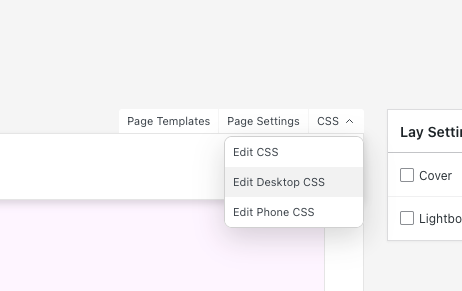
    you simply create browser height rows, then use this css:

    .row{
        position: sticky;
        top: 0;
        background-color: white;
    }
    

    just add it here on the page where u want this:

    grafik.png

    you can leave out background color white and give the rows a different bg color

    otherwise everything just overlaps and u can see all the previous content

    Addons

  • Different fixed heights for carousels on mobile and desktop
    arminunruhA arminunruh

    okay, do u have a link to your site for me to where i can see the carousel?

    u can also send it to info@laytheme.com

    Feedback

  • several styling issues with mobile and desktop menu
    arminunruhA arminunruh

    ok next version will include:

    Screenshot 2026-03-19 at 13.38.09.png

    Second issue: Menu styling and position. I am using menu style 1. I use the word menu instead of a burger icon. I want the word to be on the same horizontal line as the site title and to align left at 50% width. When it drops down, I want the word menu to appear like the first menu item and to have a vertical spacing between them that looks consistent with the words menu. I know I can’t do that with just the customizer, obviously. How should I approach this?

    can u do a quick sketch for me? not sure if i understand correctly

    General Discussion
  • Login

  • Don't have an account? Register

  • Login or register to search.
  • First post
    Last post
0
  • Recent
  • Tags
  • Popular
  • Users
  • Search