On mobile the items are always expanded and cannot be closed. On desktop, everything is still working as expected.
F
FesT
@FesT
Posts
-
Accordion is not working on mobile -
Marquee alignment not working for picturesHey Lay Theme Team,
hey @arminunruhsince the last update the alignment for pictures in a marquee, are not working anymore. Alignment is set zu middle and still the pictures are aligned to top.
See the screenshot!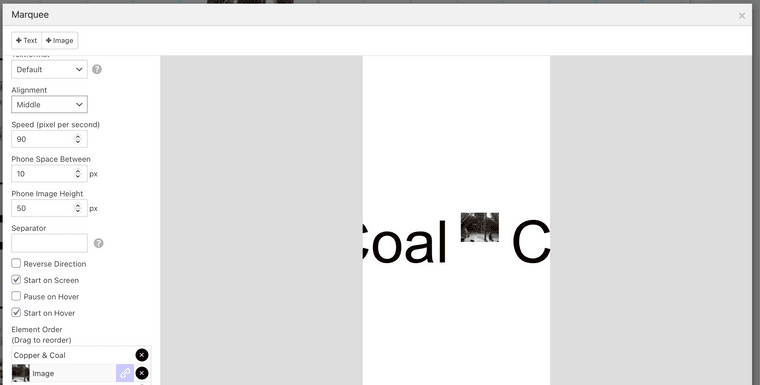
would be nice if the is a fix!
Best -
Sticky feature does not work - urgentsame here, after updating to the lates lay version 5.5.3 the sticky elements stopped working.
to be precise: sticky elements are not working in rows with custom row heigth
@arminunruh could you fix that?
thx -
Use mobile menu on desktop, easy tutorial? Drop down menu right aligned text?Thanks to the magic-world everything is working fine! @Richard thank you.
-
Use mobile menu on desktop, easy tutorial? Drop down menu right aligned text?Hi @Richard, @mariusjopen,
the described workaround, seems to be a very easy way to implement a burger menu in the desktop view. Thanks for this.
I tried to implement it, but in my sub-menu are custom links witch have also the data-type="custom". So also the submenu items get displayed as the image. Is there a way to use also custom links as submenu items?
thx
-
superscript Font issuesHey,
I just realised that if you use superscript letters/numbers in a text the line height no longer works properly. The lines with the superscript letters in it jump.
Is there a fix for that? -
Lightbox different image for gallery and lightboxHi armin, hi mariusjopen,
is there a way to show one image in the gallery and a different image in the Lightbox? What I mean is, the possibly, to klick on a image and to display another in the lightbox.
I hope there is a work around :)
best felix -
Critical Error – Lay Theme 3.0.0I have also a Fatal-Error after updating to 3.0.0
Fatal error: Uncaught Error: Access to undeclared static property: LayFrontend_Options::$playicon_id in
/wp-content/themes/lay/frontend/assets/php/frontend_options.php:84 Stack trace: #0
/wp-content/themes/lay/frontend/assets/php/frontend_options.php(187): LayFrontend_Options->__construct() #1
/wp-content/themes/lay/functions.php(47): require('/var/www/vhosts...') #2 /wp-settings.php(497): include('/var/www/vhosts...') #3
/wp-config.php(89): require_once('/var/www/vhosts...') #4
/wp-load.php(37): require_once('/var/www/vhosts...') #5
/wp-admin/admin.php(34): require_once('/va in
/wp-content/themes/lay/frontend/assets/php/frontend_options.php on line 84 -
Shortcode in TextDear @mariusjopen,
i know how you generally insert a shortcode. But my question is how to insert a shortcode into a textfield.
As I want to make a "hover footnote" in a text, when I put the shortcode extra, there will be alway problems with resizing, so that the annotation is not placed in the right place.
best felix -
Shortcode in TextDear @mariusjopen,
right now I tried it with Shortcodes Ultimate.
Best
Felix -
Shortcode in TextHi everyone, hi @arminunruh, hi @mariusjopen,
is there a way to get shortcodes into a textfield?
I try to use a tooltips as hover footnotes in a text.
It would be great if there is a way!best
Felix -
Fullscreen Slider only for mobile VersionDear @arminunruh, dear @mariusjopen,
is there a way to activate the fullscreen slider only on the mobile version and keep it deactivated on the desktop version of a site?Best
Felix -
Yoast SEO plugin compatabilityhey @arminunruh, hey @mariusjopen,
I know this is a really old topic, but I wonder if there are any news about the Yoast SEO plugin compatability?
For know it looks like the Laytheme still does not communicate with the Plugin, but it would
be super great if it would do so... :)best
-
disable scrolling on single pageDear @mariusjopen,
sorry that I write so incomprehensibly.
I try to clarify: I have a page wich is for example 5000 px high and 4000px width with a viewport of lets say 2880x1800px. I want to disable the scroll, but still want to be able to allow the viewport to move over the whole page via another script using the mouse. So I can't use height: 100vh this causes, that the script wont work anymore... You can see the situation here
I hope you get now what my problem is.Best
Felix -
wrong layout displayed / reloadDear @mariusjopen,
yes, that works. As I said the script is already inserted and works fine.
I have some how the opposite problem, when i come to the landing page the script runs just fine. But I need to unrun / override the properties of the script when i go to the next page.
Do you understand what I mean?Try this, then you see what i mean: Start here, the site is displayed correctly. Then go to Stack, its displayed wrong and still has the properties of the landing page. Now reload, then Stack ist displayed correctly. Go to home, now home is displayed wrong, even so the script runs.
I hope you can help me.
Best Felix -
wrong layout displayed / reloadDear @mariusjopen,
thanks for the answer. But actually it dosn't help.I have the script already inserted like that:
window.laytheme.on("newpageshown", function(layoutObj, type, obj){
if(type == "page" && obj.id == 9){
setRandomPageView();
}
});But in this case its the main page, if i navigate to the next page the properties of the script wont be overwritten. Thats all what causes the problem I think.
Best
Felix