Skip to content
  • Recent
  • Tags
  • Popular
  • Users
  • Search
Skins
  • Light
  • Brite
  • Cerulean
  • Cosmo
  • Flatly
  • Journal
  • Litera
  • Lumen
  • Lux
  • Materia
  • Minty
  • Morph
  • Pulse
  • Sandstone
  • Simplex
  • Sketchy
  • Spacelab
  • United
  • Yeti
  • Zephyr
  • Dark
  • Cyborg
  • Darkly
  • Quartz
  • Slate
  • Solar
  • Superhero
  • Vapor

  • Default (No Skin)
  • No Skin
Collapse

Lay Theme Forum

I

Ilina Catana

@Ilina Catana
Unfollow Follow
About
Posts
23
Topics
9
Shares
0
Groups
0
Followers
0
Following
0

Posts

Recent Best Controversial

  • Set different home page for mobile
    I Ilina Catana
    General Discussion

    @arminunruh thank you very much for getting back to me!

    I tried the code, for some reason it doesn't work yet but I'll try again tomorrow. Here is what I tried:

    <script>
    if( jQuery('body').hasClass('https://www.ludwigschoepfer.de') && jQuery('html').hasClass('is-touchdevice') ){
    window.location.replace("https://www.ludwigschoepfer.de/index");
    }
    </script>

    Homepage is called "https://www.ludwigschoepfer.de", replace page should be "https://www.ludwigschoepfer.de/index" (by the way, the website is now online). I also tried as a slug-frontpage only '/home' without success.

    If you see at first glance what went wrong, don't hesitate to let me know :)

    Best!


  • Set different home page for mobile
    I Ilina Catana
    General Discussion

    Hey @arminunruh thanks for answering!

    This is also the idea I had. If my home page is the "Home" page and the "A" page is the page I would like to have on mobile instead of the "Home" page, I can create a mobile layout "Home - Mobile" that has the same design as my "A - Mobile" page and make sure that the "A" page does not appear in the mobile menu. But it requires my client to edit the "Home-Mobile" page manually every time he edits/changes the content of the "A" page. This is quite annoying.

    Isn't there a code solution where simply the Home page does not appear on mobile, and an existing page replaces it? That would be really ideal :=)


  • Set different home page for mobile
    I Ilina Catana
    General Discussion

    Hey @arminunruh ! I'd like to set a different home page for mobile than for desktop. This topic was addressed in 2020 here but no "perfect" solution was really found. Maybe you have a better idea?

    Best!


  • Text disappearing behind image (using browser height for row height)
    I Ilina Catana
    Bug Reports

    @arminunruh thanks a lot, looks like you solved the problem in the last update. Again, thank you very much!


  • Text disappearing behind image (using browser height for row height)
    I Ilina Catana
    Bug Reports

    Hi @arminunruh!

    I'm working on another site with Laytheme and I have a little problem with text disappearing behind an image, it would be awesome if you could help me :)

    When my text frame is as wide as my image (e.g. 4 columns wide), the text appears in front of the image. When my text block is wider, it disappears behind the image. In fact, what I need is for the text block to be wider than the image and perfectly centred on it (example left side) but in front of the image.

    Here a screenshot: Screenshot 2022-12-01 at 12.42.03.png
    And here the page's link: http://new.ludwigschoepfer.de/the-only-light-at-the-end-of-the-tunnel/

    Any thought? :) Best!


  • Scroll To Top: customize hover state
    I Ilina Catana
    General Discussion

    Dear @mariusjopen

    thanks you so much!

    It was the ">*" that I was missing...
    Problem solved, and I learned something :) :)

    Thanks for taking the time!

    Best :)

    Ilina


  • Scroll To Top: customize hover state
    I Ilina Catana
    General Discussion

    Dear @mariusjopen,
    thanks a lot for your answer!

    About the link inside the class:
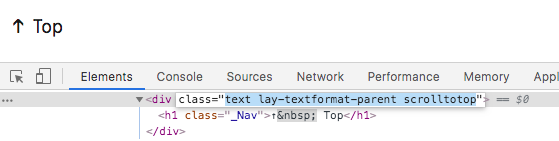
    I inspected the page and can't find a "href" for "text lay-textformat-parent scrolltotop" (see screenshot).
    Would it be something like ".scrolltotop a"?

    Thanks a lot!

    Best,
    Ilina

    0_1574716974403_Inspect_Scrolltotop.png


  • Scroll To Top: customize hover state
    I Ilina Catana
    General Discussion

    Dear @mariusjopen,

    I'm looking for a way to change the color of a link "Scroll to top" on hover.
    I added "Scroll to top" to a block and I can't give it another color during a mouse hover.

    I tried to target the ".scrolltotop" class, and to create an ID and a new class for this block.
    Unfortunately I didn't succeed in making one of these solutions work.
    I certainly made a writing error in my css code.

    Do you have an idea what could work?

    Thanks :)


  • Row Image Background: no cropping
    I Ilina Catana
    General Discussion

    Dear @mariusjopen,

    Alright, I'll keep trying :)

    Thank you!

    Ilina


  • Row Image Background: no cropping
    I Ilina Catana
    General Discussion

    Dear @mariusjopen,

    thanks a lot for your answer and your time!

    I tried it. The page is now online: https://seedbiosciences.com/

    When I reduce the size of my browser window, the image continues to be cropped.
    As if it were centered and the window cut the top and bottom of the image when the size of the window is reduced.
    Do you have any idea where this came from?

    0_1572626482139_Window_Fullscreen.png
    0_1572626492125_Window_Smaller_Height.png

    Thanks a lot for your help!

    Best!

    Ilina


  • Row Image Background: no cropping
    I Ilina Catana
    General Discussion

    Dear @mariusjopen,

    on the home page of my site I use a fullscreen image (Row image Background + Cover option).

    This image begins with a red semi-circle.
    When my window is a certain width, the beginning of the image is cut off and this first red half-dot disappears.
    My question: is it possible to force the image to always start at the top of my window?

    That's what I tried to code:

    html.objectfit.background-image img {
    object-fit: unset!important;
    width: 100%!important;
    height: auto!important;
    position: absolute!important;
    left: 0!important;
    top: 0!important;
    }

    With this code, the image starts at the top of my browser regardless of the size of my window.
    Unfortunately under the picture is a large white banner (see picture below).
    I tried to remove this space by changing the "height" setting but unfortunately it doesn't work.

    Website url: https://seedbiosciences.com

    Can you please help me?

    Thanks in advance!

    Ilina
    0_1570103437689_Home_Exemple.png


  • Full screen Carousel (captions issue)
    I Ilina Catana
    Addons

    Dear @mariusjopen,

    I decided on another solution, similar to the one we talked about.
    Thanks for the help!
    And thank you for developing Laytheme, it is a pleasure to work with this tool.

    Have a good day,

    Ilina


  • Full screen Carousel (captions issue)
    I Ilina Catana
    Addons

    Dear @mariusjopen,

    well, that's really strange, it's working here... :)
    I updated it again.

    Could you please try it again? :)

    Thanks!!


  • Full screen Carousel (captions issue)
    I Ilina Catana
    Addons

    Dear @mariusjopen

    thanks for your answer!

    I tried negative margin, the captions then "disappear" behind the .slide-inner...
    I added a red background to it... Can you help?

    Here is the page: https://studio-catana.com/home
    PSW: 123

    Thanks for your help...!!!

    Ilina


  • Full screen Carousel (captions issue)
    I Ilina Catana
    Addons

    Hello !

    I use the "carousel" addon and would love to have on my homepage a full screen slider with captions under each image, adapting to the height of the screen. Is that possible? (like in this exemple: www.studiogameiro.com)

    To get a "full screen" carousel, I used the code mentioned by @mariusjopen on the blog:

    .carousel-full {
    height: 100vh;
    }

    .lay-carousel.sliding {
    height: 100vh;
    width: 100vw;
    }

    .collar .lay-carousel img.h100 {
    object-fit: cover;
    height: 100vh;
    width: 100vw;
    }

    The captions are unfortunately well below than the "carousel", and not showing in my browser height. What can I do to integrate the captions in the visible part of my screen?

    Would love to hear if if anyone has any suggestion. Thanks!


  • Customize menu item
    I Ilina Catana
    General Discussion

    @edgrbnz Thank your very much for your answer!!!

    Best!

    lina


  • Customize menu item
    I Ilina Catana
    General Discussion

    Hi there!

    I'm looking for an option to customize menu items.
    I would like, for example, to change the size/color of some letters in the name of one of my menu items.

    Here is an example:
    0_1549040989259_Screen Shot 2019-02-01 at 18.07.17.png

    Is this possible with Laytheme?

    I thought I could maybe enter HTML code as a menu item...

    Any other suggestion?

    Thanks in advance for your help :) :) :)

    Ilina


  • Mobile: thumbnail image Link
    I Ilina Catana
    General Discussion

    Hi @edgrbnz thanks a lot for your information.
    I was looking for information on the forum and noticed that my answer had not been sent. I must have made a mistake.

    Thank you very much for your answer!


  • Thumbnails grid: Images Proportions
    I Ilina Catana
    General Discussion

    Hi @edgrbnz @mariusjopen,

    thanks a lot for your answers.

    I wanted to avoid my client the extra work of preparing each thumbnail separately with a transparent background.

    My knowledge of CSS being limited, I worked with an offset on the "X" axis for all vertical images. For the moment it works relatively well on Desktop and Laptop.

    Thank you again!

    Ilina


  • Thumbnails grid: Images Proportions
    I Ilina Catana
    General Discussion

    Hey Laytheme :)

    I am looking to make a Thumbnails grid where the vertical and horizontal images would have the same proportions and not the same width.

    I try to make it look like this:
    0_1537787856564_Exemple_Thumbnail_Grid_right.png

    It actually looks like this:
    0_1537787908707_Exemple_Thumbnail_Grid_wrong.png

    Here is the url of the page in question: http://www.andreaseifert.de/portfolio

    Can you help me?

    Thank you in advance! :)

    Best,

    Ilina

  • Login

  • Don't have an account? Register

  • Login or register to search.
  • First post
    Last post
0
  • Recent
  • Tags
  • Popular
  • Users
  • Search