Skip to content
  • Recent
  • Tags
  • Popular
  • Users
  • Search
Skins
  • Light
  • Brite
  • Cerulean
  • Cosmo
  • Flatly
  • Journal
  • Litera
  • Lumen
  • Lux
  • Materia
  • Minty
  • Morph
  • Pulse
  • Sandstone
  • Simplex
  • Sketchy
  • Spacelab
  • United
  • Yeti
  • Zephyr
  • Dark
  • Cyborg
  • Darkly
  • Quartz
  • Slate
  • Solar
  • Superhero
  • Vapor

  • Default (No Skin)
  • No Skin
Collapse

Lay Theme Forum

O

officear

@officear
About
Posts
12
Topics
5
Shares
0
Groups
0
Followers
0
Following
0

Posts

Recent Best Controversial

  • can't update
    O officear

    @arminunruh omg so easy! feeling stupid now for asking that question haha
    thanks a lot <3 <3 <3

    Installation Problems

  • can't update
    O officear

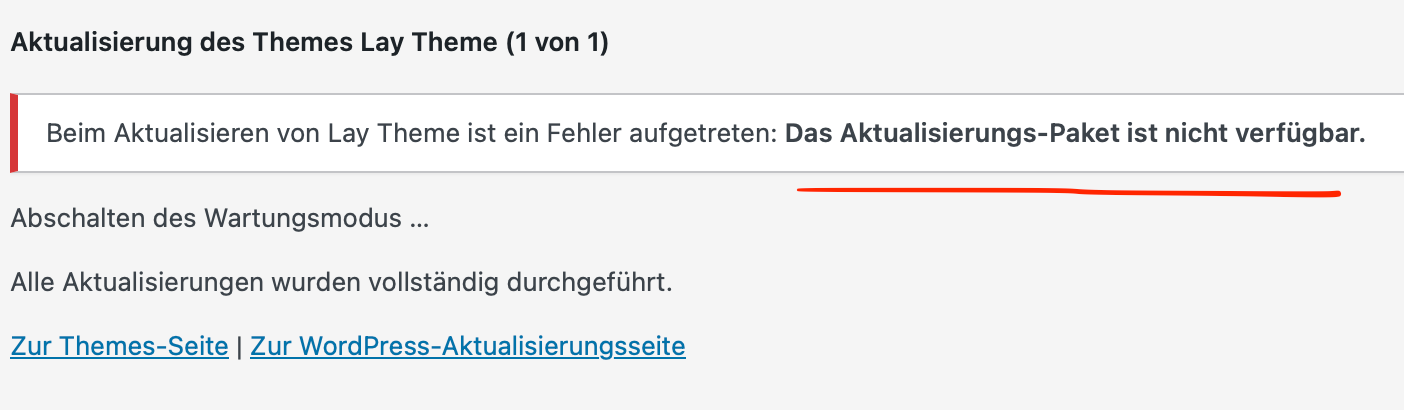
    I'm having difficulties to update Lay Theme. Whenever I try to, I get this error message:
    Das Aktualisierungs-Paket ist nicht verfügbar. / Update package not available.

    update1.png

    Already tried to deactivate all custom code + plugins, Wordpress is up to date, and it's happening on every browser :(

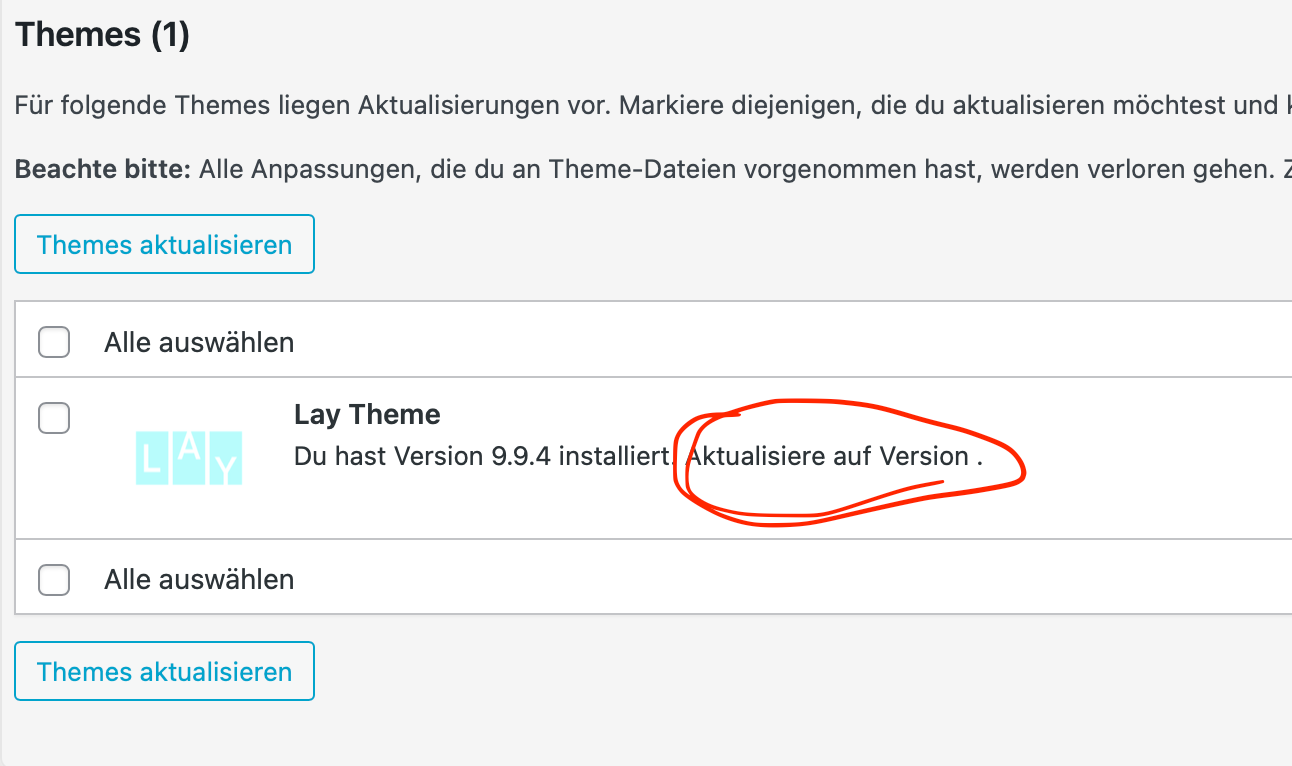
    I also noticed, that under "Dashboard > Update" the number of the new version is missing, if that helps somehow:

    update2.png

    The problem seems to be the same as mentioned here.

    Before I follow the steps you mentioned there, I wanted to ask:
    Can I just use the lay.zip file you shared in the post above, or is there a newer one? Do I just install it like I would when installing a new theme? Does it replace the old Lay Theme version automatically? Can anything be lost from my existing site while doing this?

    Thanks a lot in advance <3

    Installation Problems

  • display categories & tags as text on project page
    O officear

    @arminunruh works perfectly – thank you so so much <3 <3 <3

    General Discussion

  • display categories & tags as text on project page
    O officear

    @arminunruh
    first a belated but huuuuuge thank you!
    so so cool that you really coded it into the theme <3 <3 <3

    i was wondering, if it’s possible to change the separator for the tags/categories in text from a comma to anything else? like you can in the project index style settings for example.

    I found the classes .lay-categories-in-text and .lay-category-in-text for styling, but i can’t influence the separator sign through the css, right?

    thanks in advance <3

    General Discussion

  • switch/toggle between project index and thumbnail grid?
    O officear

    @arminunruh @alasdair17
    thanks a lot for your ideas and responses – will definitely give it a try <3

    General Discussion

  • switch/toggle between project index and thumbnail grid?
    O officear

    Is there a possibility to switch/toggle between project index and thumbnail grid for a project overview?

    Similar to this example as listed on the laytheme website:
    https://www.benjaminmugnier.fr/images/

    If I understood it correctly, the workaround here are two seperate pages/URLS for both view modes, right?

    Is it possible to solve it without two URLS? I’d like to stay on one site (URL), and just „turn off“ one and „switch on“ the other one, so my navigation/menu won't be messed up? haha

    Thanks in advance <3

    General Discussion

  • Do I need a cookie notice?
    O officear

    @felix_rabe
    thank you for answering me :)

    @arminunruh
    you are right, I tried now without being logged in as admin, and no cookies are visible anymore :)

    so thanks a lot for your detailed answer and the additional cookie test <3

    General Discussion

  • Do I need a cookie notice?
    O officear

    My site runs with plain Laytheme and it’s own plugins.
    No extras, no third party content, no woocommerce, nothing embedded. (+ disabled the potential Youtube-cookies in the Carousel Addon settings.)

    As I read in several forum postings Laytheme itself doesn’t use any cookies,... which is really great btw <3

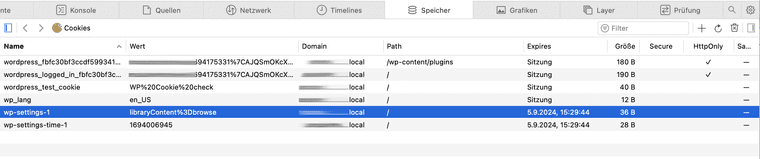
    When I check the storage information with the inspector, I still get a list of 6 cookies from Wordpress:

    cookies.png

    Do I have to notify the users about these cookies? Probably yes, right? :)

    It’s my first site ever, so I want to be sure what I'm doing and we all know how visually unpleasant cookie banners might be hahaha
    (The site is for a small company within the EU, if that matters.)

    I know you can’t give me officially legal advice here, but what is your experience with this topic?

    Thanks for your help <333

    (Sorry no link, because I work local :) )

    General Discussion

  • display categories & tags as text on project page
    O officear

    @arminunruh

    thanks for your answer
    i will check the plugins out, and thanks for writing down the idea <3

    General Discussion

  • Thumbnail replace image not working
    O officear

    @arminunruh
    thanks for the update
    it works perfectly now! <3

    Bug Reports

  • Thumbnail replace image not working
    O officear

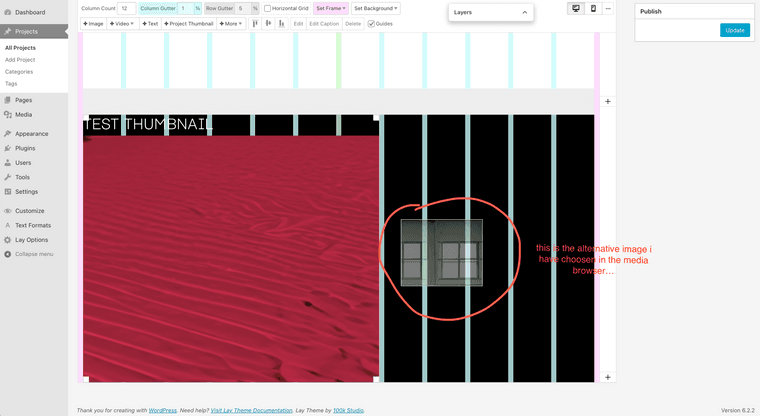
    If i got it right, you can change the image of a project thumbnail element by right click and choosing an alternative image in the media browser…

    Somehow it is not replacing the image, and just gives me the option to place it as a regular image somewhere else.

    Am I doing/getting something wrong, or is it a bug?

    thumbnailproblem.png
    (tried with safari/chrome/firefox on mac osx 13.2.1 / laytheme 5.7.2 / wordpress 6.2.2 / working offline with Local)

    Bug Reports

  • display categories & tags as text on project page
    O officear

    Hi Lay Theme Forum :)

    I tried to search the forum, but I couldn’t find any solution so far:

    I am looking for a way to display all assigned categories and tags (that have been set through the Wordpress CMS) of a project in form of a text box on the project’s page itself.

    See quick layout here:
    (I’m working locally, so I don’t have a link sorry!)

    layout.png
    Like an overview or little „legend“, in which fields I contributed to the projects.

    In other words: I would like to „grab“ the assigned categories and tags somehow, and display them as text.

    In the gridder elements „Project Index" and „Thumbnail Grid“ assigned tags and categories appear for example. I would need this kind of functionality, but just for the project that is currently shown and without any extras (no thumbnail images, no title, no other projects, no filter function, etc.)

    How can I achieve something like that? Custom code? Any workaround? Or am I missing something super obvious? haha

    I really hope someone can help me <3
    Thanks a lot and all the best
    oar

    General Discussion
  • Login

  • Don't have an account? Register

  • Login or register to search.
  • First post
    Last post
0
  • Recent
  • Tags
  • Popular
  • Users
  • Search