Wau!! Didn’t know there are WooCommerce Settings in Customize! Was doing everything manually with CSS! Haha! Thank you!!
Aleksandar
Posts
-
Standard WooCommerce tabs -> accordion? -
Standard WooCommerce tabs -> accordion?Hi Armin,
I’m creating a variable product in WooCommerce because I offer different sizes. For a regular product, the description appears directly beneath the “Add to Cart” button. But as soon as it becomes a variable product, the standard WooCommerce tabs turn into an accordion. How can I skip this accordion? I just want the description to appear as plain text, like it did before.
Here’s a product example:
-
link in product descriptionThank you. :-)
-
link in product descriptionHi Armin,
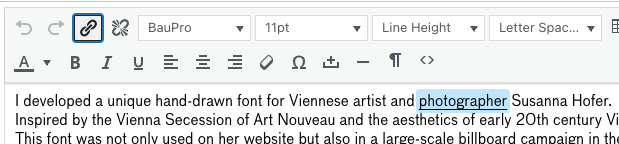
I’d really like to be able to add a link directly in the product description. The small chain icon is visible in both the main product description and the short description, but it doesn’t actually let me define a link.
In the main product description, there’s still an HTML source view where I can manually insert a link, but it would be much better if both fields allowed links to be added directly through the standard toolbar buttons.

All best
Aleks -
Long loading time.thank you!
"you mean project overview page in wp-admin?"
yes, this one! -
Long loading time.Hi Armin,
The page is taking quite a long time to load. :-/
I’m wondering what could be causing this. The projects overview page has around 200 project pages. And on the backend projects overview page, all pages are now displayed at once, whereas before there were page numbers. Could this be caused by a plugin, or is it part of the new LayThemes update?
Unfortunately, sometimes a 500 error also appears. Could it be possible that the issue is caused by the client entering content incorrectly? For example, if they copy-paste text and it creates messy HTML.
I hope I can find a solution.
All best
Aleks -
Project thumbnails same heightHey Armin, thank you very much! Last CSS version is completely fine! Thank you very much! And YES, next time I'm posting a link. :-)
Merry Christmas and guten Rutsch! :-D
-
Project thumbnails same heightHi Armin,
maybe this has already been asked and answered somewhere. If so, I’d appreciate a link.
Otherwise, my question is:
how can I make all project thumbnails the same height, even if the titles have different lengths? Sometimes the titles are one line, sometimes two lines, which makes the thumbnails different heights. Since I’m using a background color for the entire project thumbnail, it would be great if they were all the same height.
Is there a way to do this with custom CSS? I just can’t figure it out. I’ve tried all sorts of things, but nothing seems to work. :-/
All best
Aleks -
"load more" button for projectsOk ok! I totally understand. 😝 Only do things that reach a broader audience. 😎 But thank you for having a look.
Actually I did something similar for my shop:
https://aleksandartodorovic.com/shop/Every row is a different project/product category. It works perfectly. 💗
-
"load more" button for projects@arminunruh said in "load more" button for projects:
its actually the first time someone ever asked for this :O
I’m usually quite good at that! 🤣😵💫 Thanks for clearing up.
Nevertheless I thought I’d just share my idea: basically, it’s a refined selection for the user, sorted by categories, which are then divided into additional sub-categories. It’s a more defined way of structuring things to create a kind of overview page or index that gives a nice, clear snapshot of everything.

-
"load more" button for projectsHey Armin! Thanks for the update, really appreciate how quickly you pulled this off. 🙌
Now I have a quick question: I’m trying to show multiple Projects Thumbnail sections on one page with “Load More” buttons. Could it be that “Load More” can’t be used multiple times on the same page? Some are showing up some don’t. 🧐
Also, I was wondering if it’s possible to add AND and OR options for the category filter as well, similar to what already exists for tags.
And last but not least, (just a suggestion), since potentially there could be a lot of projects, it would be amazing to have a small search field that visually matches the filter bubbles. The more projects there are, the more useful a quick search becomes. 😵💫😆
All best
Aleks -
Can't save Webfont (link tag)Hola Armin,
I’m trying to add some web fonts from Adobe Fonts using a link tag, but the changes won’t save. Uploading fonts works fine, tho.
All best
Aleks -
gridder disappearsHi Armin,
I tried editing some text in the gridder, but as soon as I double-click it, the gridder disappears. It becomes completely invisible. When I refresh the page, it shows up again. Is this a bug?The page has almost no plugins.
All best
Aleks
-
Can't delete webfontsThank youu
-
Can't delete webfontsHola Armin!
I tried deleting some imported fonts, but I can’t seem to do it. A pop-up window appears outside the browser window, and I can’t access it. Is this a bug, or is there a way to fix it?
All best
Aleks
-
Conditional category filteringHi there!
I’m wondering if it’s possible to implement conditional filtering in the Thumbnail Grid. For example, to display only the projects that are tagged with both category A and category B, while excluding those that are tagged with only one of them.
All best
Aleks -
"load more" button for projectsAh ok! That would be sooo amazing! Saving my ass! :-DDDD
Looking forward! Appreciate and love your effort. LayTheme is outstanding! ;-)
-
"load more" button for projectsHello Armin,
having a bunch of questions these days. :-)
So I was wondering if there is a Load More button for Project thumbnails? I see that it already exists for News.
I’m using Projects as a database, and there will be a large number of documents in certain categories, so displaying them all at once would be too much. :-S
Could I create a Load More button for Projects somehow?
All best
Aleks -
Tags integrated in Links?Hey Armin,
I assume there’s still no update regarding the tag URL tags. I’m wondering if there might be any workaround? Maybe through a plugin or a code snippet to assign these tags manually.
I have a page that features multiple projects (ca. 200), and I’d like visitors to be able to filter them using an advanced search filter. I was thinking of using the Everything Filter plugin for this purpose, but I’m not sure whether it’s compatible with Lay Theme.
I was hoping there might be some way to make this work.
All best,
Aleks -
embed Social wall (fb, IG, yt, etc.)merci! :-)